Photographers always ask me the same question: is Showit actually good for SEO, or am I wasting my time? It is a fair question — and the answer is not what most people expect.
Showit has a reputation problem when it comes to SEO. Most photographers have heard that the platform holds them back, that Showit SEO is broken, or that they need to switch to Squarespace or WordPress to compete in search results.
That reputation is wrong. And I can prove it.
This guide covers exactly how to do Showit SEO the right way, from page titles and H1 tags to site speed, mobile optimization, and the WordPress blog strategy that builds long-term authority. Everything you need to rank your Showit photography website on Google, without switching platforms or hiring an agency. Start with our complete SEO for Photographers guide if you are new to photography SEO.
Can You Really Rank a Showit Website on Google?
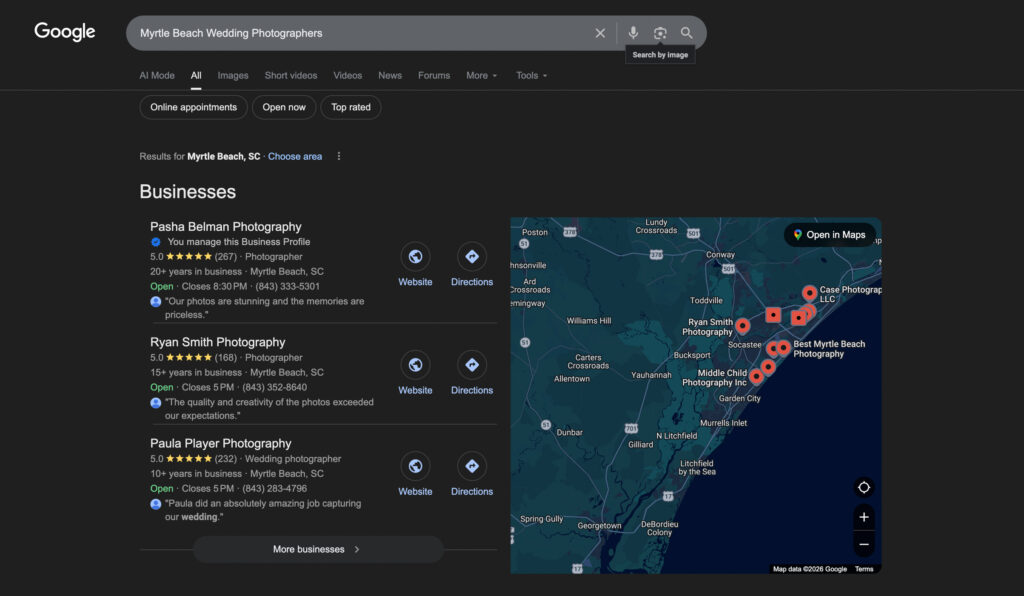
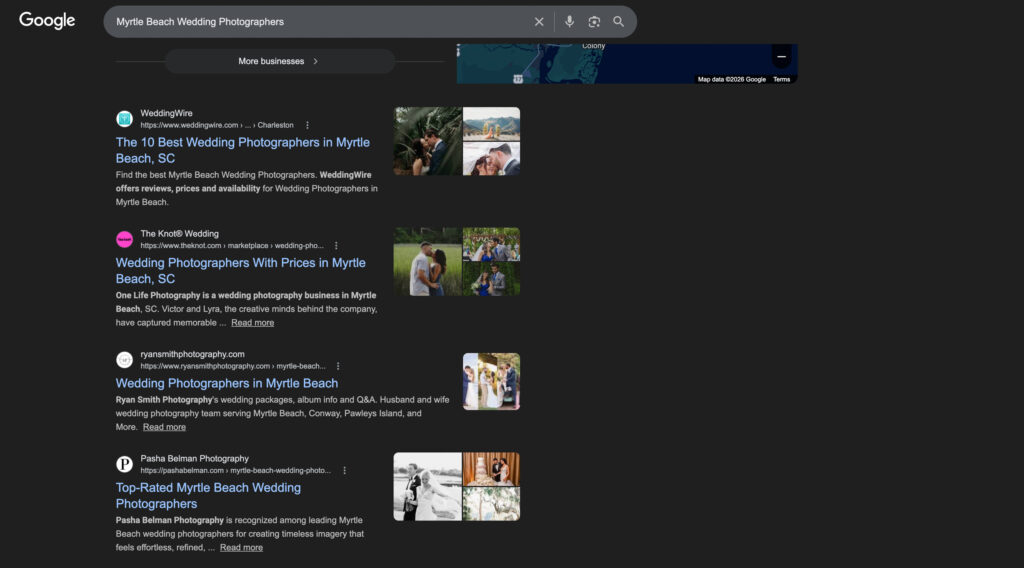
Yes. And the proof is not theoretical.
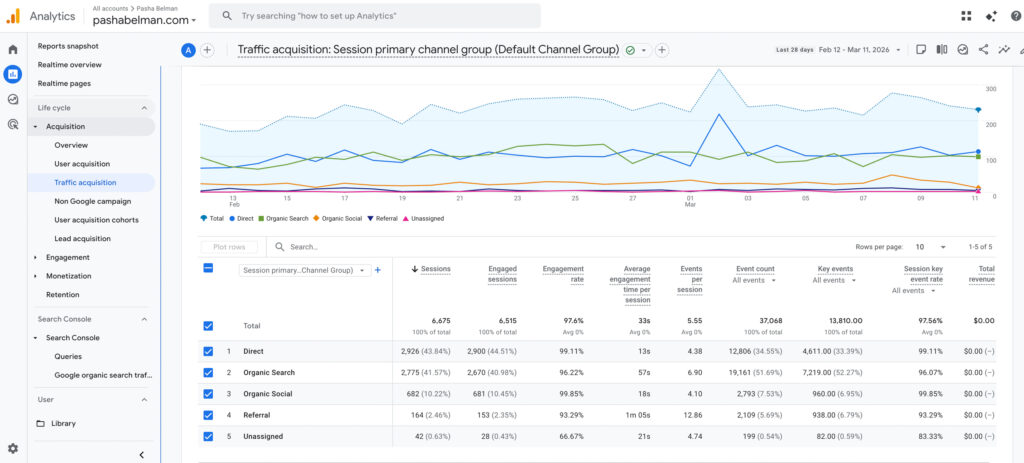
Pasha Belman Photography ranks on the first page of Google for competitive photography searches in Myrtle Beach, South Carolina. The entire site is built on Showit. No paid ads. No agency. Just a properly optimized Showit website and a content strategy built around what real clients are searching for.
The photographers who struggle to rank on Showit are not struggling because of the platform. They are struggling because their site was never properly optimized. Page titles are generic. Meta descriptions are missing. H1 tags are not set. Blog content targets no specific keywords.
Fix those things on a Showit site and it will rank. This guide shows you exactly how.
Why Showit Is Actually Good for SEO
Showit gets a bad reputation for SEO because it renders pages using JavaScript and canvas elements instead of traditional HTML. Early versions of Google had trouble crawling JavaScript-heavy sites, so the reputation stuck.
Google has come a long way since then. Googlebot now crawls and indexes JavaScript rendered pages without issue. The platform is not your problem.
Here is what actually matters for SEO:
- Page titles and meta descriptions
- Header tags (H1, H2, H3)
- Site speed and mobile performance
- Content quality and keyword relevance
- Internal linking structure
- Backlinks and domain authority
Showit gives you full control over all of these. The photographers who say Showit cannot rank are the photographers who never properly optimized their Showit site.
Is Showit Better Than Squarespace for Photographers?
For photographers specifically, Showit wins. Here is why.
Squarespace locks you into a grid-based design system. Every element snaps to a template layout. For photographers who want a site that looks as good as their work, that is a significant creative limitation.
Showit gives you a completely free canvas. Every element can be placed anywhere on the page. The result is that Showit photography websites consistently look more polished, more editorial, and more aligned with the photographer’s brand than anything you can build on Squarespace.
From a pure SEO standpoint both platforms give you the essential tools: page titles, meta descriptions, alt text, and SSL. The real difference is the blog. Showit connects directly to WordPress which is the most powerful blogging platform available. Squarespace has its own built-in blog which works but does not give you the plugin flexibility, the Yoast SEO integration, or the long-term content authority that WordPress provides.
For a photographer serious about ranking on Google and building a site that represents their work at the highest level, Showit is the stronger choice.
Showit vs WordPress for Photographers: Which Is Better for SEO?
This is the most common comparison photographers make when researching website platforms. But here is what most people do not realize: Showit and WordPress are not competitors. They work together.
Every Showit plan comes with a connected WordPress blog. That means you get Showit’s drag and drop design freedom for your main pages and WordPress’s powerful blogging engine for your content. You are not choosing one over the other. You are using both.
Here is what that looks like in practice:
- Main pages: Built on Showit with full design freedom and no coding required
- Blog: Runs on WordPress with Yoast SEO, full plugin access, and the content authority WordPress is known for
- Hosting and security: Managed by Showit so you never have to worry about updates breaking your site
- Design quality: Custom canvas control that no WordPress theme can match
- SEO capability: Everything a photographer needs to rank including page titles, meta descriptions, H1 tags, alt text, schema markup, and a fully optimized WordPress blog
The photographers who rank on Google are not ranking because they chose WordPress over Showit. They are ranking because they optimized their site correctly and published content consistently. You can do both on Showit.
Is Showit Worth It for Photographers?
If you are serious about building a photography business that gets found on Google, yes. Showit is worth it.
Here is what you get with a Showit subscription:
- Full design freedom: No grid system, no template restrictions. Every element on every page is fully customizable.
- Connected WordPress blog: The most powerful blogging platform available, built into your subscription.
- Yoast SEO: The industry standard SEO plugin for optimizing every blog post you publish.
- SSL certificate: Included automatically. Your site is secure and trusted by Google.
- Separate mobile canvas: Full control over how your site looks and performs on mobile, which is where most of your clients are finding you.
- Managed hosting: Showit handles the technical side so you can focus on your photography business.
The photographers who say Showit is not worth it are usually the ones who signed up, never optimized their site, and wondered why Google was not sending them traffic. The platform is not the issue. The strategy is.
How Showit and WordPress Work Together for SEO
One of Showit’s biggest SEO advantages is something most photographers overlook. Every Showit site comes with a connected WordPress blog. This is not a limitation. It is one of the most powerful SEO tools available to photographers.
Here is why it matters. Google ranks websites that publish consistent, relevant content. A WordPress blog connected to your Showit site lets you publish keyword-targeted blog posts that build authority over time and drive search traffic directly to your photography business.
The structure looks like this:
- Your Showit site handles your main pages: home, about, portfolio, services, contact
- Your WordPress blog handles content: guides, location posts, real wedding features, SEO articles
- Both live under the same domain, so every blog post builds authority for your entire site
This is exactly how Pasha Belman Photography built its search presence. The Showit pages rank for high-intent local searches. The WordPress blog captures broader search traffic and feeds visitors back to the booking pages.
Does Showit Have a Blog?
Yes. Every Showit plan includes a connected WordPress blog. This is one of the most important things to understand about the platform before you sign up.
You are not getting a basic built-in blog like Squarespace offers. You are getting a full WordPress installation connected directly to your Showit site. Your blog lives at the same domain as your main site, which means every blog post you publish builds authority for your entire photography website.
Here is why that matters for SEO:
- WordPress is the most widely used blogging platform in the world and Google trusts it
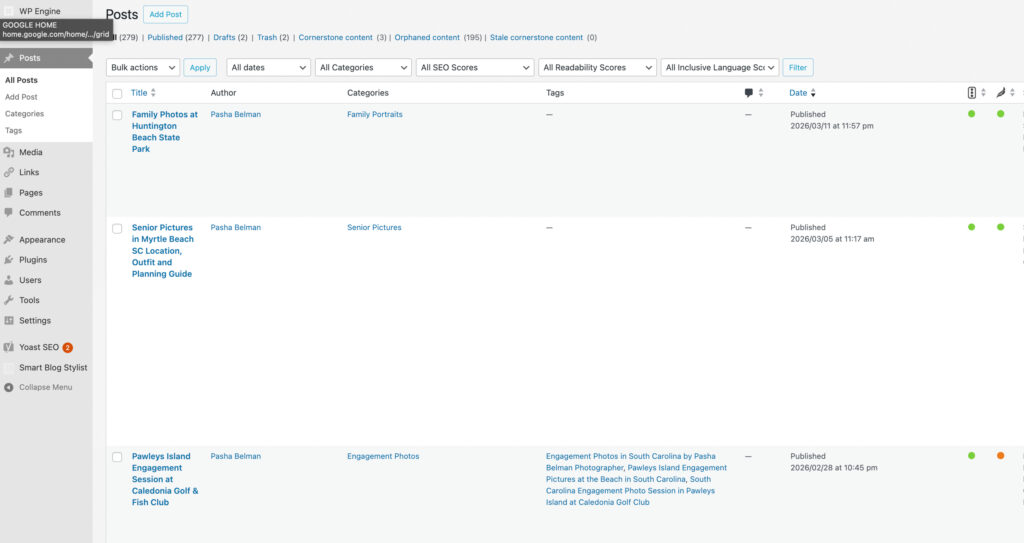
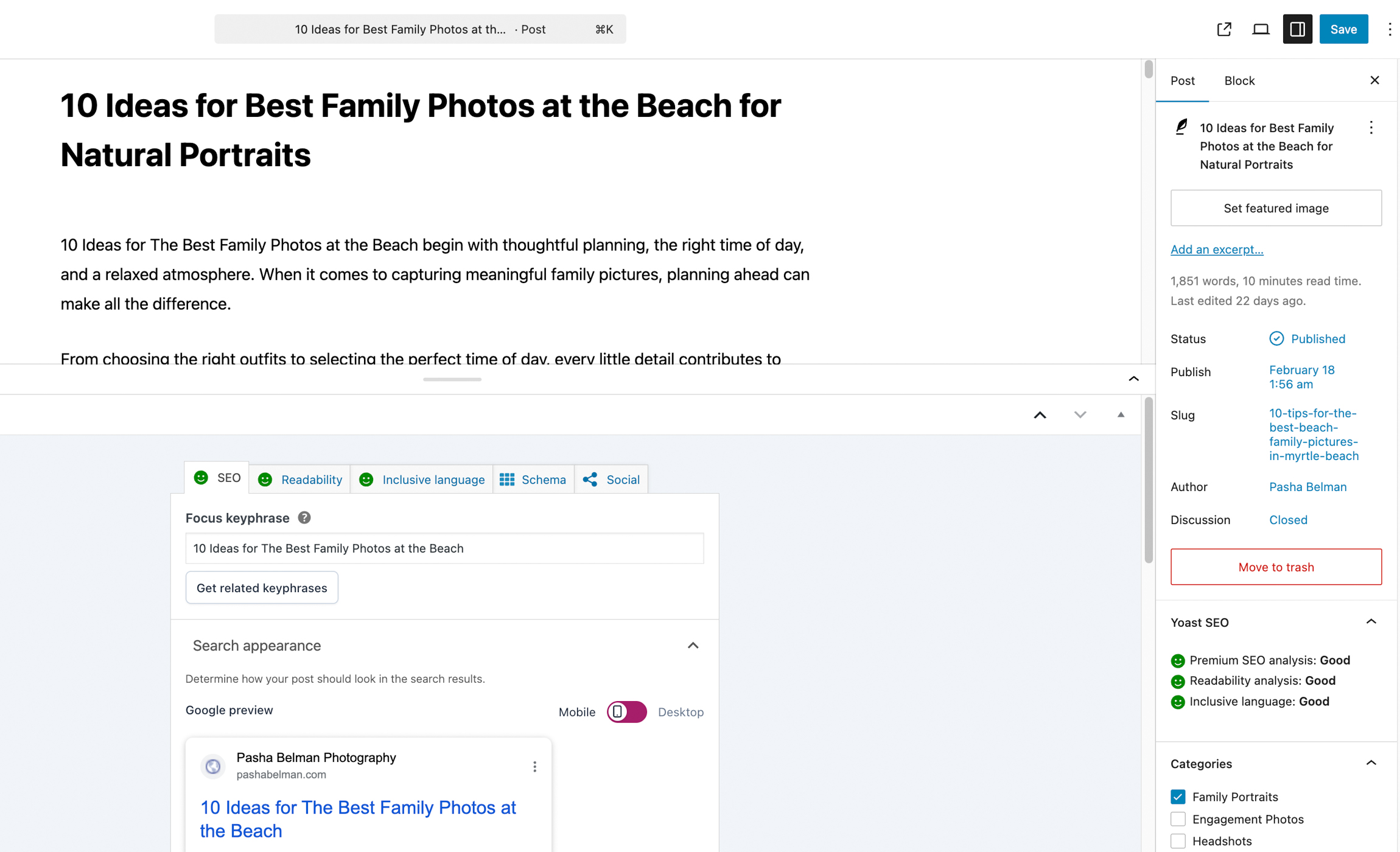
- You get access to Yoast SEO which gives you real-time optimization feedback on every post
- You can install additional plugins to extend your blog’s functionality
- Every post you publish is a new page Google can index and rank
- Blog content builds topical authority which strengthens your main service pages over time
For photographers, the blog is where the real SEO growth happens. Your main Showit pages rank for your primary keywords like Jacksonville wedding photographer. Your blog captures every other search your potential clients are making: best wedding venues in Jacksonville, what to wear for family photos, how far in advance to book a photographer.
That combination is powerful. And it is built into every Showit subscription.
Does Showit Work With Yoast SEO?
Yes. Because Showit connects directly to WordPress for blogging, you get full access to Yoast SEO on every blog post you publish.
Yoast is the industry standard SEO plugin for WordPress and one of the most powerful tools available for optimizing blog content. Here is what it does for your photography blog:
- Focus keyphrase analysis: You enter the keyword you are targeting and Yoast tells you exactly how well your post is optimized for it
- Readability score: Yoast checks your writing for sentence length, paragraph structure, and clarity so your content is easy to read on any device
- Google preview: You can see exactly how your post will appear in search results before you publish, including your title and meta description
- Internal linking suggestions: Yoast suggests relevant posts on your site to link to, which strengthens your overall site structure
- Schema markup: Yoast automatically adds structured data to your posts which helps Google understand your content and can improve how your results appear in search
Yoast is not available on your main Showit pages since those are managed through the Showit canvas. For your main pages you optimize directly inside Showit’s SEO settings panel. But for your blog, which is where most of your keyword targeted content will live, Yoast gives you everything you need to publish posts that rank.
Setting Up SEO on Your Showit Site
Showit has built-in SEO settings that most photographers either ignore or set up incorrectly. Getting these right is the foundation of everything else.
Page Titles
Every page on your Showit site needs a unique, keyword-targeted page title. Your page title is what appears in Google search results as the blue clickable headline. It is one of the strongest on-page SEO signals you have.
A good page title formula for photographers:
Primary Keyword | Your Business Name
For example:
- Myrtle Beach Wedding Photographer | Pasha Belman Photography
- Myrtle Beach Family Photographer | Pasha Belman Photography
- Myrtle Beach Senior Photographer | Pasha Belman Photography
Meta Descriptions
Your meta description is the short paragraph that appears under your page title in search results. It does not directly affect rankings but it does affect click through rate. A well written meta description tells potential clients exactly what you offer and why they should click.
Keep meta descriptions between 150 and 160 characters. Write them for the person searching, not for Google.
How to Set Your H1 Tag in Showit
Every page on your site needs exactly one H1 tag. The H1 tells Google what the page is about and is one of the most important on-page SEO signals. Most photographers on Showit have no H1 set on their pages without realizing it.
The good news is that Showit makes this easy without any code. In the Showit canvas, click on your main headline text element. In the text toolbar, find the paragraph style dropdown and change it from Paragraph to Heading 1. That tells Showit to output that text as a proper H1 tag.
A few rules to follow:
- Only one element per page should be set to Heading 1
- The H1 should include your primary keyword for that page
- Use a free tool like Detailed SEO Extension to confirm your H1 is set correctly after publishing
Showit SEO Settings: Page by Page Optimization
Every page on your Showit site needs to be optimized individually. A common mistake photographers make is setting up the homepage and ignoring every other page. Google crawls and evaluates each page separately.
Here is how to optimize each page correctly in Showit.
How to Access SEO Settings in Showit
In the Showit canvas, click on the page you want to optimize in the left panel. Then click SEO Settings in the right panel. You will see fields for:
- Page Title
- Meta Description
- Share Image
Homepage
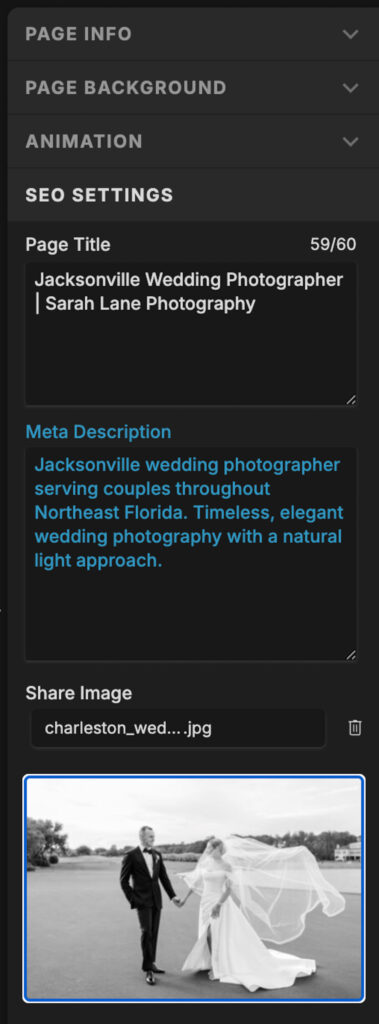
Your homepage should target your primary location and service keyword. For most photographers this looks like:
- Page Title: Jacksonville Wedding Photographer | Sarah Lane Photography
- Meta Description: Jacksonville wedding photographer serving couples throughout Northeast Florida. Timeless, elegant wedding photography with a natural light approach.
- H1: Jacksonville Wedding Photographer
Notice the page title is 59 out of 60 characters. You want to get as close to 60 characters as possible without going over. Every character is an opportunity to include your keyword and your brand name.
Service Pages
Each service you offer should have its own dedicated page with its own keyword target. Do not try to rank one page for weddings, families, and seniors at the same time. Give each service its own page, its own title, its own H1, and its own meta description.
Location Pages
If you serve multiple cities or areas, build a dedicated page for each location. A page targeting Austin family photographer will rank for searches in that area in a way that your homepage never will.
Showit Blog SEO: How to Use WordPress to Rank for More Keywords
Your Showit pages can only rank for so many keywords. A wedding photographer in Jacksonville can optimize their homepage for Jacksonville wedding photographer, their family page for Jacksonville family photographer, and their senior page for Jacksonville senior photographer. But what about every other search their potential clients are making?
This is where your WordPress blog becomes your most powerful SEO tool.
Every blog post you publish is a new page Google can index. Each one is an opportunity to rank for a different keyword, answer a different question, and attract a different type of client.
What to Blog About for SEO
The most effective blog content for photographers falls into three categories:
- Location posts: Real sessions at specific venues and locations. A post titled Jacksonville Beach Engagement Session will rank for people searching for photographers at that location.
- Planning guides: Posts that answer questions your clients are already searching. What to wear for family photos. Best places for engagement photos in Jacksonville. How far in advance to book a wedding photographer.
- Keyword targeted posts: Posts built around specific search terms like Jacksonville family photographer or outdoor wedding venues in Northeast Florida.
For photographers focused on ranking in their city, read the complete Local SEO for Photographers guide.
How Often Should You Blog for SEO
Consistency matters more than volume. One well optimized post per week will outperform five rushed posts. Focus on quality, keyword research, and content that genuinely helps your ideal client.
Showit Site Speed and Mobile SEO
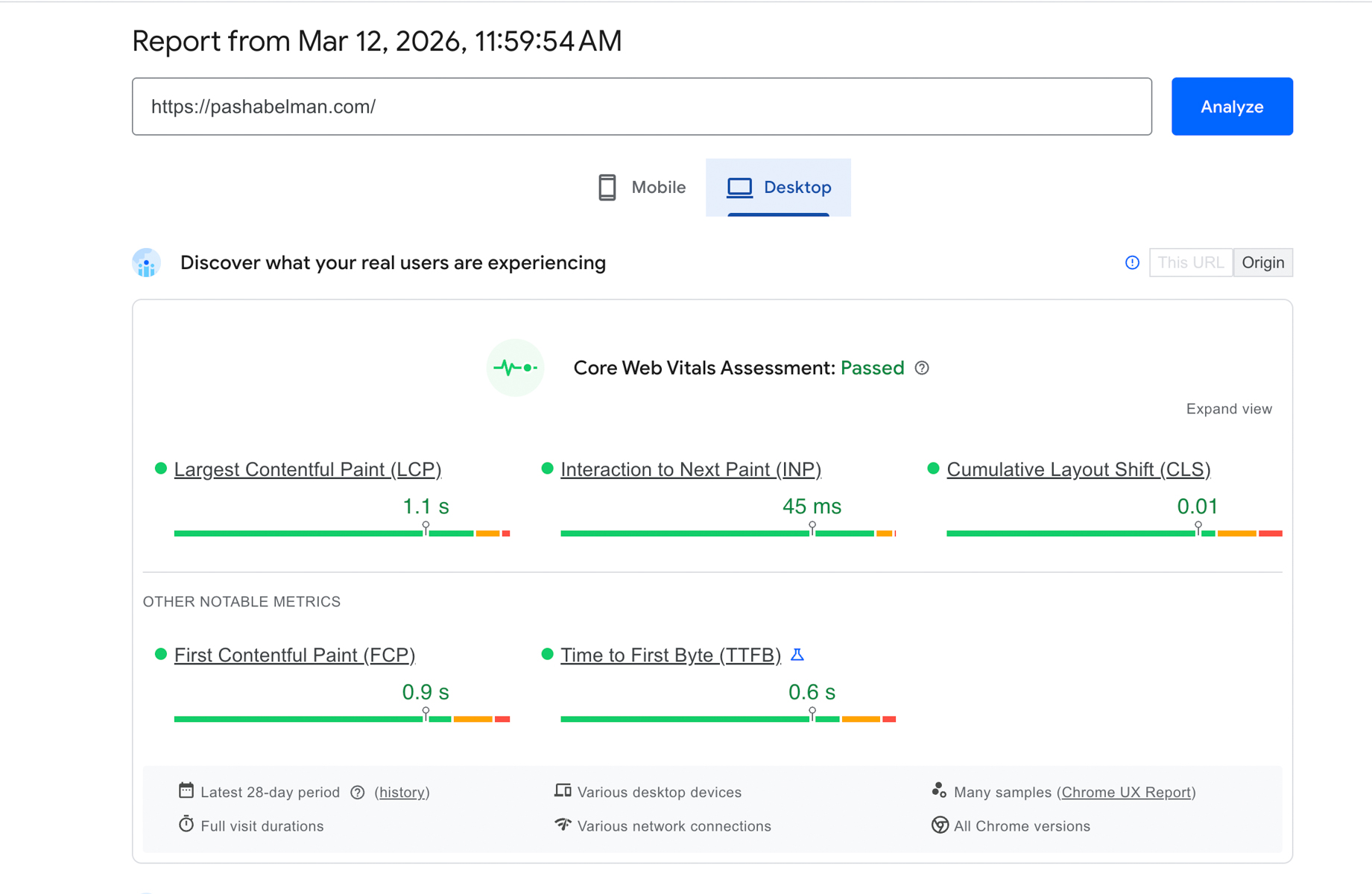
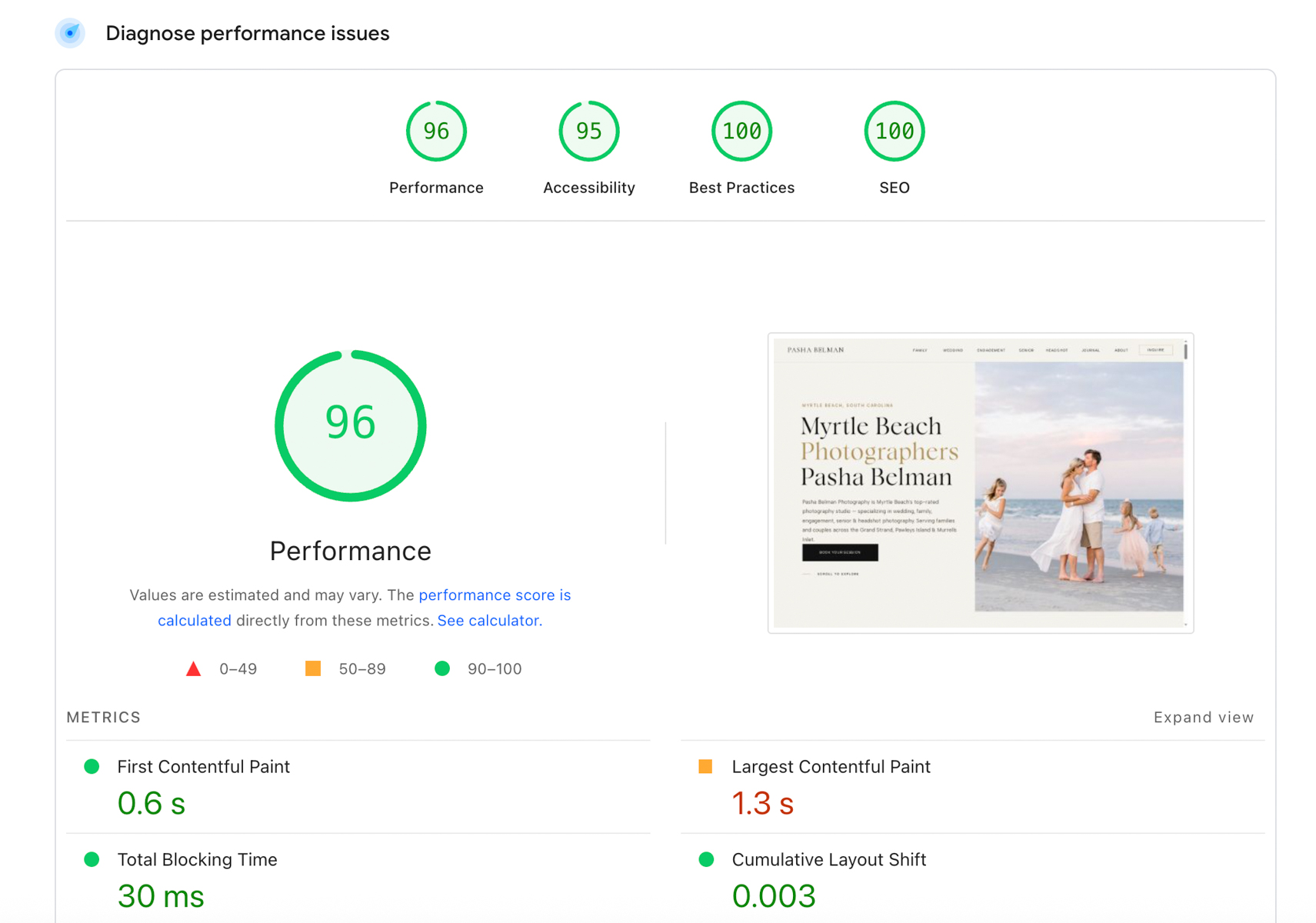
Google uses site speed and mobile performance as direct ranking factors. A slow website loses rankings and loses clients. Most photographers do not realize their Showit site has a speed problem until they check.
How to Check Your Showit Site Speed
Go to Google PageSpeed Insights and enter your website URL. Google will give you a score from 0 to 100 for both mobile and desktop performance along with specific recommendations.
For photographers the most common speed issues are:
- Images that are too large: A 5MB photo looks identical to a 300KB photo on screen but loads 15 times slower. Every image on your site should be compressed before uploading.
- Too many fonts: Each font family and weight you load adds to your page load time. Limit your site to two font families maximum.
- Uncompressed video backgrounds: Video backgrounds are beautiful but devastating for load time. If you use one, keep the file under 5MB and always provide a static image fallback for mobile.
Mobile Optimization in Showit
Showit gives you a separate mobile canvas which means you design your desktop and mobile versions independently. This is a huge advantage for SEO because Google uses mobile-first indexing. What Google sees on mobile is what determines your rankings.
Make sure your mobile canvas has:
- All the same text content as your desktop version
- Readable font sizes (minimum 16px for body text)
- Clickable buttons and links with enough spacing
- No hidden text or missing sections
Can You Add Google Analytics to Showit?
Yes. Google Analytics connects to Showit easily and takes less than five minutes to set up. Tracking your traffic is essential for understanding what is working in your SEO strategy and where your visitors are coming from.
Here is how to add Google Analytics to your Showit site:
- Step 1: Go to analytics.google.com and create a Google Analytics 4 property for your website
- Step 2: Copy your Measurement ID. It will look something like G-XXXXXXXXXX
- Step 3: In Showit, go to Site Settings and click on the Integrations tab
- Step 4: Paste your Measurement ID into the Google Analytics field
- Step 5: Publish your Showit site and verify the connection in Google Analytics
Once connected, Google Analytics will track every visitor to your site including where they came from, which pages they visited, how long they stayed, and whether they completed any actions like clicking your contact button or visiting your pricing page.
For photographers using SEO, Google Analytics works alongside Google Search Console to give you a complete picture of your search performance. Search Console shows you which keywords you are ranking for. Analytics shows you what visitors do after they land on your site.
Both tools are free and both are essential.
How Do You Add Alt Text in Showit?
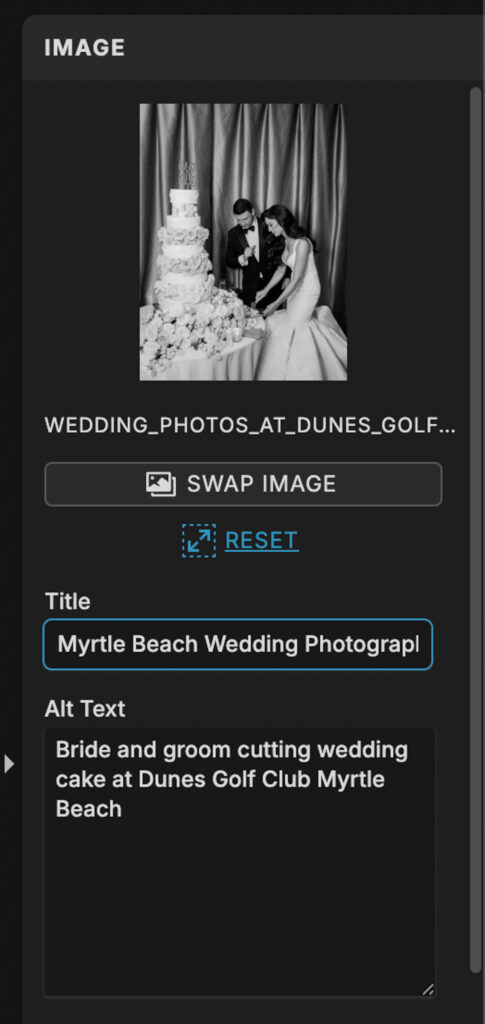
Alt text is one of the most overlooked SEO elements on photography websites. Every image on your Showit site should have descriptive alt text. This helps Google understand what your images are about and helps your photos appear in Google Image search results, which is an additional source of traffic for photographers.
Here is how to add alt text to images in Showit:
- Step 1: Click on any image in your Showit canvas
- Step 2: In the right panel look for the Image settings
- Step 3: Find the Alt Text field and enter a clear descriptive description of the image
Here is how to write good alt text for photography websites:
- Be descriptive: Describe what is actually in the photo. “Bride and groom walking on Jacksonville Beach at sunset” is better than “wedding photo”
- Include your keyword naturally: If the image is on your wedding photography page, work your location and service into the description naturally
- Do not keyword stuff: “Jacksonville wedding photographer Jacksonville wedding photos Jacksonville FL photographer” is not alt text. It is spam and Google treats it that way
- Keep it concise: One clear descriptive sentence is enough. You do not need a paragraph
- Do not start with “image of” or “photo of”: Google already knows it is an image. Just describe what is in it
A simple rule: write alt text the way you would describe the photo to someone who cannot see it.
Showit SEO and Google Business Profile
Your Showit website and your Google Business Profile work together. Most photographers treat them as separate things. They are not. They are two parts of the same local SEO strategy.
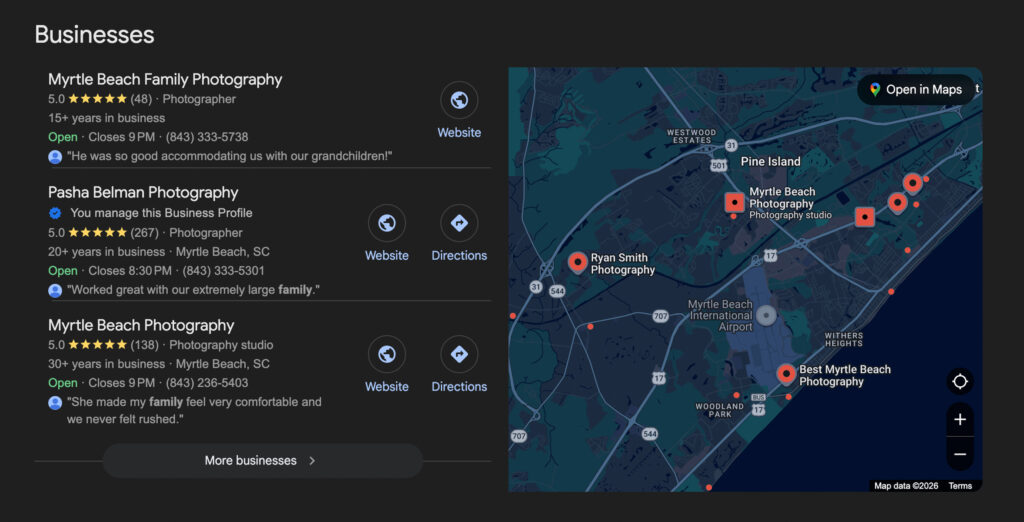
When someone searches for a photographer in their city, Google shows two types of results. The map pack at the top showing local businesses, and the organic results below. A properly optimized Showit site combined with a complete Google Business Profile gives you the opportunity to appear in both.
How to Connect Your Google Business Profile to Your Showit Site
- Make sure your business name, address, and phone number on your Google Business Profile exactly match what is on your Showit website
- Add your website URL to your Google Business Profile
- Use the same primary keyword in your Google Business Profile description that you use on your Showit homepage
- Keep your business category set to Photographer, not a generic category
Reviews and SEO
Google reviews are a direct local ranking factor. The more five-star reviews your Google Business Profile has, the stronger your local search presence becomes. Every client you photograph is an opportunity to strengthen your SEO.
Pasha Belman Photography has built over 250 five-star reviews over 15 years. That review count is a significant reason the business ranks at the top of local search results in a competitive tourist market.
How to Build Internal Links on Your Showit Site
Internal linking is one of the most underused SEO strategies among photographers. Every time you link from one page on your site to another, you are telling Google which pages are important and how they relate to each other.
A strong internal linking structure helps Google understand your site and helps visitors find more of your work.
Internal Linking for Photographers
Here is how to build internal links naturally throughout your Showit site:
- On your homepage, link to each of your service pages
- On each service page, link to your contact page and your blog
- In every blog post, link to at least one service page that is relevant to the content
- When you mention a specific location, link to your location page for that area if you have one
- In your about page, link to your most important service pages
How to Add Links in Showit
In the Showit canvas, select any text element, highlight the words you want to link, and click the link icon in the text toolbar. You can link to any page on your site or any external URL.
For blog posts the linking happens inside WordPress. As you write each post, look for natural opportunities to link back to your Showit service pages. A post about Jacksonville beach engagement sessions should link to your engagement photography page.
Showit SEO Limitations (And How to Fix Every One of Them)
Showit is a powerful platform for photographers but it is not perfect. Knowing where it falls short means you can fix every issue before it costs you rankings.
JavaScript Rendering
The problem: Showit builds pages using JavaScript. New pages can take longer for Google to fully index compared to traditional HTML pages.
The fix: Submit your sitemap to Google Search Console and use the URL Inspection tool to request indexing for new pages as soon as you publish them.
No Automatic Image Compression
The problem: Showit does not compress images on upload. Large image files slow your site down and hurt your PageSpeed score.
The fix: Compress every image before uploading using Squoosh or TinyPNG. Both are free. Aim for images under 300KB.
Limited Schema Markup Control
The problem: Adding structured data to a Showit site is more technical than platforms where plugins handle it automatically.
The fix: Add your schema markup manually as JSON-LD code in the Custom Head HTML field under Site Settings. A LocalBusiness and Person schema covers most of what photographers need.
Mobile Canvas Is Separate
The problem: Every desktop change needs to be manually replicated on mobile. An outdated mobile canvas can quietly hurt your rankings since Google uses mobile-first indexing.
The fix: Make it a habit to check your mobile canvas every time you update your desktop. Always preview mobile before publishing any changes.
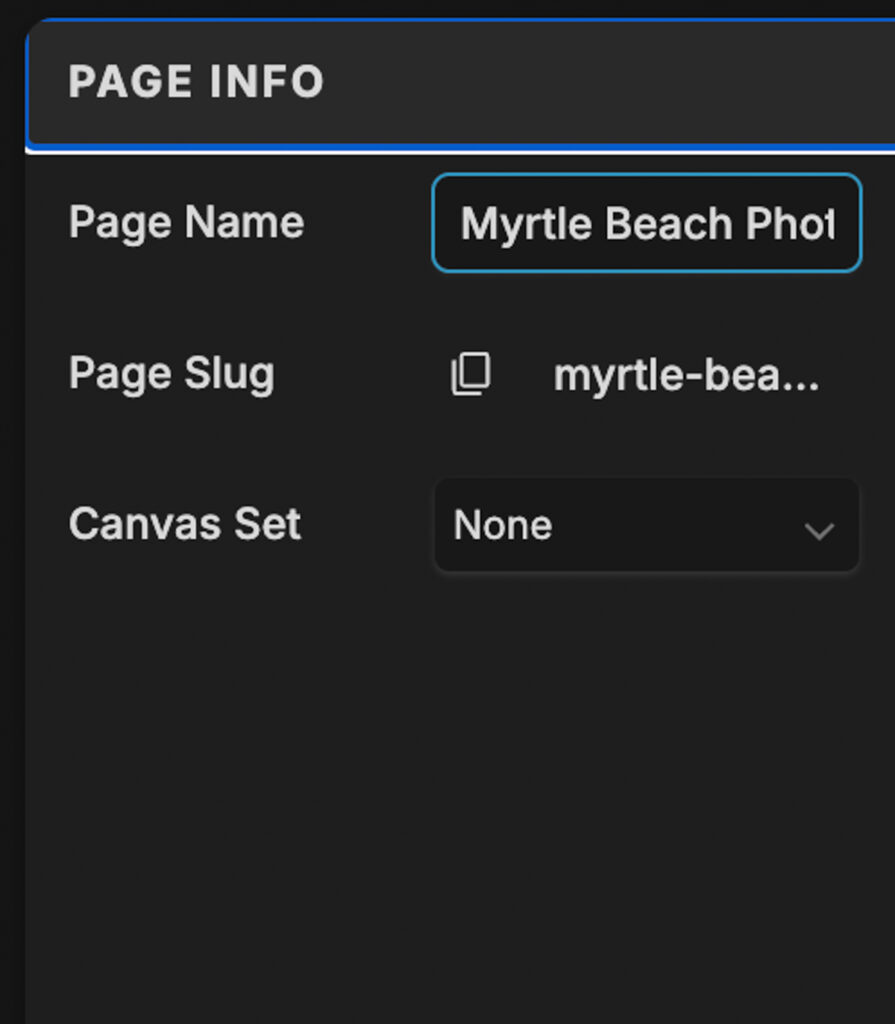
URL Structure Is Controlled by Your Page Name
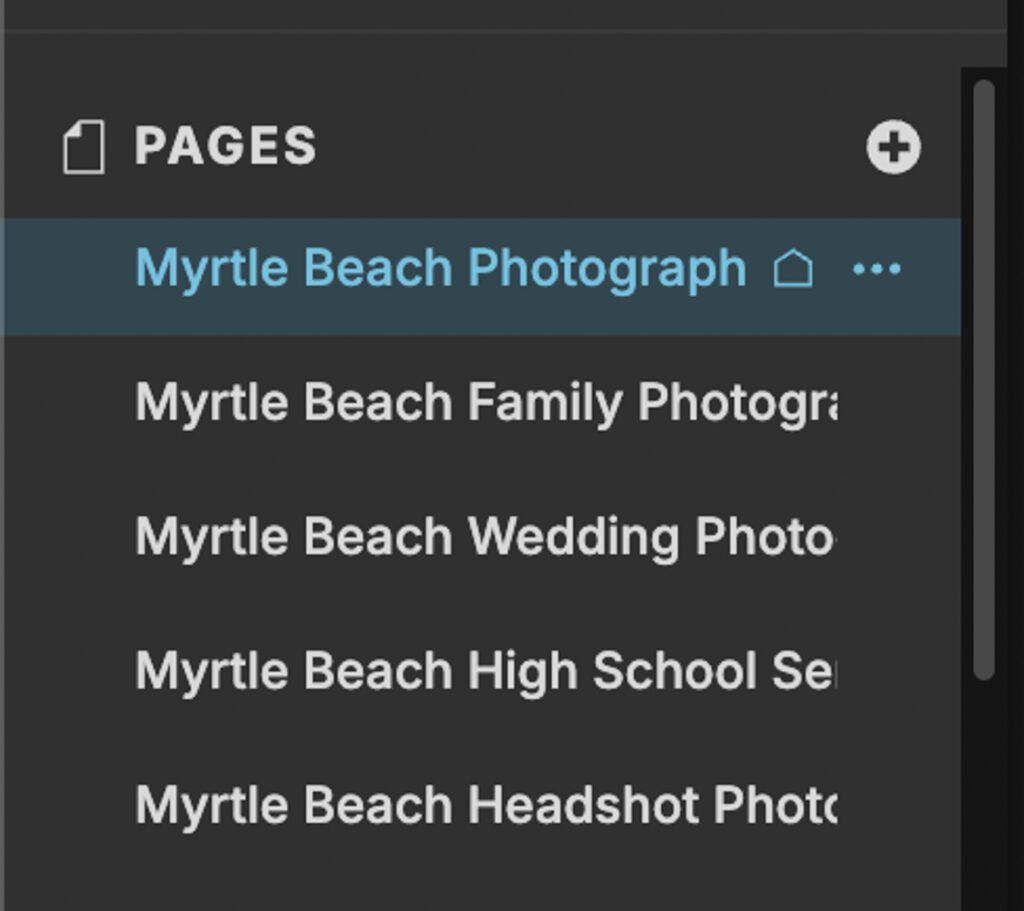
The problem: In Showit, your page name becomes your URL. Name a page “Myrtle Beach Photographer” and your URL is /myrtle-beach-photographer. There is no separate field to customize it independently. Change it later and you risk losing any ranking you have already built.
The fix: Decide the exact URL you want before creating any new page in Showit. Use your primary keyword as the page name and the URL takes care of itself.
Is Showit Worth It for SEO Despite the Limitations?
My entire business is built on Showit. Both Pasha Belman Photography and Belman & Co. run on it. So I am not going to pretend it is a perfect platform.
Showit has real limitations compared to other platforms. And I am not here to convince you to build your next site on it. But if you are already on Showit and you want to rank on Google, I can help you. I know every limitation, I know every fix, and I have the rankings to prove it works.
The platform is not the problem. The setup is.
How Long Does It Take to Rank a Showit Website?
This is the question every photographer asks before investing in SEO. The honest answer is that it depends on three things: how competitive your market is, how well your site is optimized, and how consistently you publish content.
Here is a realistic timeline for most photographers:
- Month 1 to 2: Google crawls and indexes your optimized pages. You may start appearing in search results for low competition keywords and long tail searches.
- Month 3 to 4: Pages start moving up in rankings as Google builds trust in your site. Blog posts begin picking up impressions in Google Search Console.
- Month 4 to 6: Consistent traffic from organic search starts to show in Google Analytics. Inquiries from Google begin coming in.
- Month 6 to 12: Rankings stabilize for your primary keywords. Blog content compounds and drives increasing traffic over time.
- Year 2 and beyond: SEO becomes your primary source of leads. Your site builds authority and becomes increasingly difficult for competitors to outrank.
SEO is not a quick win. It is a long term asset. Every page you optimize and every blog post you publish adds to a foundation that keeps working for you without ongoing ad spend.
Pasha Belman Photography has been building its search presence for over 15 years. The result is a photography business that books from organic search alone, with no paid advertising, no agency, and no social media dependence.
That is what consistent Showit SEO looks like over time.
Showit SEO Checklist: Everything You Need to Rank
Use this checklist to audit your Showit site and make sure every SEO element is in place.
Site Level
- Sitemap submitted to Google Search Console
- Google Analytics connected
- Schema markup added to site header code
- Google Business Profile complete and linked to your site
- Site speed above 90 on Google PageSpeed Insights
- Core Web Vitals passing
Every Page
- Unique page title targeting a specific keyword (50 to 60 characters)
- Meta description written for the searcher (150 to 160 characters)
- One H1 tag set through the Showit text element heading settings
- Images compressed before uploading
- Alt text added to every image
- Mobile canvas matches desktop content
- Internal links pointing to related pages
Blog Posts
- Focus keyphrase set in Yoast
- Yoast SEO score green
- Yoast Readability score green
- Page title and H1 matching
- Meta description between 150 and 160 characters
- At least one internal link to a service page
- Images compressed and alt text added
- Post assigned to the correct category
Ready to Rank Your Showit Photography Website on Google?
Showit is not the problem. An unoptimized Showit site is the problem. Every limitation covered in this guide has a fix, and every fix is something you can implement without switching platforms, hiring a developer, or running a single paid ad.
The photographers who rank on Google are not the ones with the biggest budgets or the most followers. They are the ones who took the time to optimize their site correctly and build content that their ideal clients are actually searching for.
If you are looking for a Showit SEO specialist who has actually built a six-figure photography business on Showit, that is exactly what we do at Belman & Co. Our Showit SEO services are built around your specific market, your keywords, and your photography business. Not a generic checklist. Not a cookie cutter audit. A real strategy from someone who has ranked on Showit for over 15 years.
You built your business behind a camera. Let SEO bring the clients to you.